Software by Mattalnet
Process Bridge
The program for the path from the inbox to the ERP. Process Bridge reads documents and export files, recognises the format, converts the data and prepares the handover to your systems. Everything runs on your computer.
Made for companies where orders, delivery notes and lists are still carried between programs by hand. You install Process Bridge like any other program. Your documents only leave the computer when you explicitly trigger it.
- macOS and Windows
- Free 14-day trial
- Your data stays on your computer
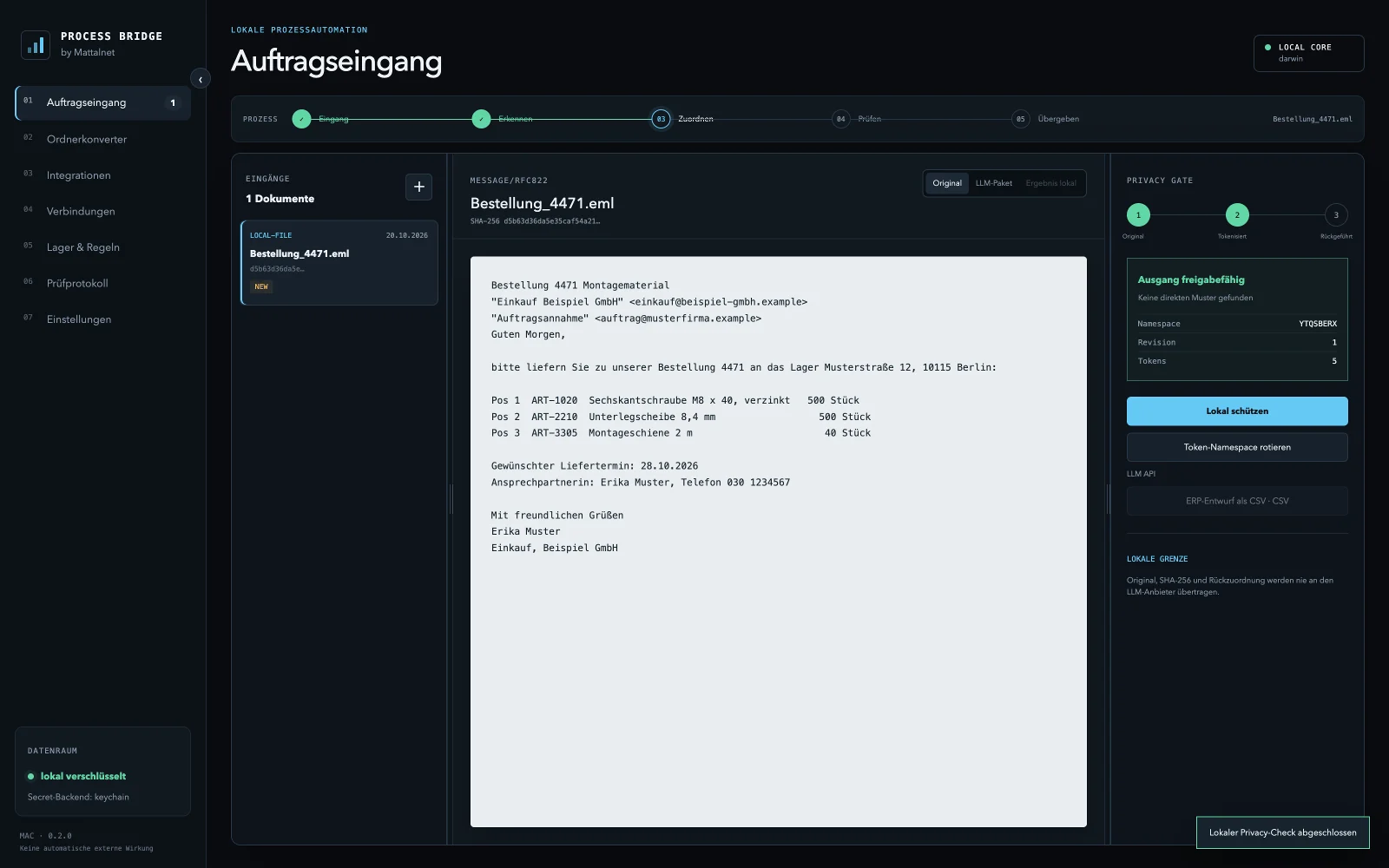
What Process Bridge does for you
Read and recognise documents
PDFs with a text layer, emails, CSV, JSON, XML and more. The program recognises format and content automatically and spots duplicate files by their fingerprint.
Convert folders automatically
One program drops export files into a folder, Process Bridge converts them straight into the target format, such as CSV, JSON or XML. Originals are never moved and results are never overwritten.
Confidential data stays protected
Before any text goes to a language model, the Privacy Gate replaces names, addresses and identifiers with placeholders. The mapping stays on your computer and is only put back there.
Connect mailboxes and systems
IMAP and Gmail are read only. For ERP, CRM and accounting there are connection profiles with secure sign-in, and the connection test changes no data.
AI, locally if you like
Process Bridge works with local models through Ollama or LM Studio. An external model is possible, but only behind the Privacy Gate and only with your approval.
Traceable and encrypted
Local storage is encrypted with the operating system's key store. The audit log records every step without storing document content or credentials.
How a case runs
- IntakeYou drag a file into the program, fetch emails or let it watch a folder.
- RecogniseProcess Bridge determines the format and reads text, sender, line items and fields.
- MatchItems are matched against your article list, customers and fields are assigned.
- ReviewYou see the draft, correct it where needed and approve it. Nothing happens without your approval.
- Hand overThe result is created as a file in the format you need, ready to import into your target system. A direct handover through an interface is set up with you for each system.
Formats
Reads
- PDF with text layer
- Email (EML, IMAP, Gmail)
- CSV and TSV
- JSON
- XML
- HTML
- TXT, LOG and Markdown
- YAML
- EDI and EDIFACT
Writes
- CSV and TSV
- JSON and NDJSON
- XML
- TXT and Markdown
Support for scanned documents, images and Word and Excel files is in preparation. XRechnung, ZUGFeRD and DATEV formats are only enabled once they have been checked for your specific workflow.
Connections
Process Bridge includes profiles for 20 widely used systems with their official sign-in methods. The connection test only reads. Writing to a target system is enabled only once the field mapping and an acceptance test have been documented for your system.
- Microsoft 365
- Google Workspace
- Nextcloud
- Odoo
- Dynamics 365 Business Central
- SAP Business One
- Oracle NetSuite
- Xentral
- weclapp
- JTL-Wawi
- Sage Accounting
- Lexware Office
- sevdesk
- DATEV
- HubSpot
- Salesforce
- Pipedrive
- Zoho CRM
- Shopify
- WooCommerce
All trademarks belong to their owners. A profile does not mean a ready-made data exchange.
Try it free for 14 days
Enter your name and email address. The download starts right away, and we send you the trial key by email.
- Full functionality
- One computer
- No payment details
- Ends automatically after 14 days
Installation
macOS
- Open the DMG file and drag Process Bridge into the Applications folder.
- Start Process Bridge from the Applications folder.
- If macOS says the app cannot be verified: open System Settings, choose Privacy & Security and click “Open Anyway” next to Process Bridge.
- On first start, decide whether the program should be protected by a local password.
- Enter the trial key from the email and click “Activate”.
Windows
- Run the setup file and follow the instructions. No administrator rights are needed.
- If Windows SmartScreen shows a notice, click “More info” and then “Run anyway”.
- Open Process Bridge from the Start menu or the desktop shortcut.
- On first start, decide whether the program should be protected by a local password.
- Enter the trial key from the email and click “Activate”.
macOS and Windows show these notices because the program is currently delivered without a developer certificate from Apple and Microsoft. If you wish, check the SHA-256 checksum of the file.
System requirements
- macOS
- Version 12 Monterey or later, Apple silicon or Intel
- Windows
- Windows 10 or 11, 64-bit
- Disk space
- about 500 MB
- Internet
- for activation and the daily license check, works up to 7 days offline
- Program language
- German, English, Russian
Request a license
A license runs for one year and is issued per computer. Tell us how many workstations you need and we will send you an offer. After your order you receive the invoice and your license key by email.
- Runs for one year, renewable
- Can be moved to another computer
- Data from the trial is kept
- Interface setup on request
Frequently asked questions
What happens after the 14 days?
The program locks its working functions and shows a notice. Your data and settings stay on the computer. As soon as you enter a license key, you carry on where you left off.
Are my documents uploaded to a cloud?
No. Documents, fingerprints and keys stay on your computer. For the license check the program only sends the license key, a random installation id, the device name and the version. An external language model is only contacted if you set it up and trigger it yourself.
Do I need a permanent internet connection?
No. The computer needs a connection once for activation. After that the program checks the license once a day and keeps working for up to seven days without a connection.
Can I connect Process Bridge to our ERP?
Connection profiles for 20 widely used systems are included, and the connection can be tested read only. Automatic writing to your system is set up together with you and tested before it is enabled. This is part of our Integrations & local automation service.
Can I move the program to another computer?
Yes. Sign it off on the old computer under Settings › License and activate it on the new one with the same key. If the old computer is no longer available, we free the seat for you.
Why does my computer warn me during installation?
macOS and Windows show this notice for programs without a developer certificate from Apple or Microsoft. Process Bridge is currently delivered without this certificate. The SHA-256 checksum on this page shows that your file is unchanged.
What stage is the software at?
Process Bridge is in its pilot phase. The functionality described here is included in the program and tested. Text recognition for scans and support for Word and Excel files follow in later versions.